
고정 헤더 영역
상세 컨텐츠
본문
최근 7개월간 업무를 통해 클로드를 처음 접하게 되었고, 이제 7개월째에 접어들었네요 ㅎㅎ (저는 사실 회사에서 챗gpt, 제미나이, 클로드 모두 결제해서 프로모드로 돌아가면서 사용중이에요ㅋㅋ)
그런데 UI 디자인을 수정하면서 정말 많이 사용하게 되었던 색상 선택 도구가 오늘 갑자기 필요하다는 생각이 들었어요.
저는 필요할 때마다 구글에서 HTML Color Picker를 검색해서 돋보기(?) 기능이 있는 사이트를 종종 애용했었는데 어느날 검색해도 잘 못찾겠는거에요. 너무 귀찮아서 그냥 뚝딱딱 만들면 되지 않을까? 하고 제미나이에게 시켰는데, 정말 간단히 만들어준거 있죠..ㅎㅎ 챗gpt에게도 시켜봤는데, 귀여움 한스푼 추가해달라고 해서 만들었더니 너무 귀엽게 만들어준거에요.
(몇 년전에 처음 html, css 등을 배우면서 코딩에 관심을 가지게 되었는데 조금 쓰다가 js가 너무 어려워서 그만두게 되었다는...ㅜㅜ)
그런데 ai를 이용할 기회가 생기면서 그런것들을 배우지 않아도 대화만으로 원하는걸 구현하는게 너무 재미가 쏠쏠했어요.
디자인
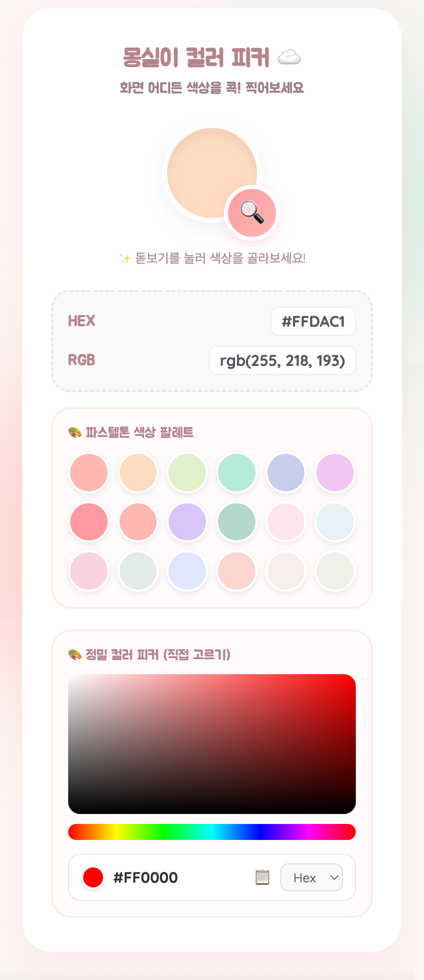
진짜 이런걸 몇초만에 뚝딱 만들어주니까 html 파일로 바탕화면에 놔두고 쓰니까 편하네요 ㅎㅎ
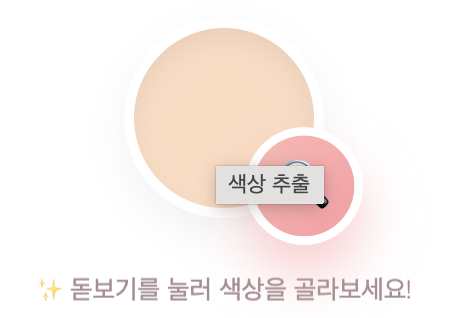
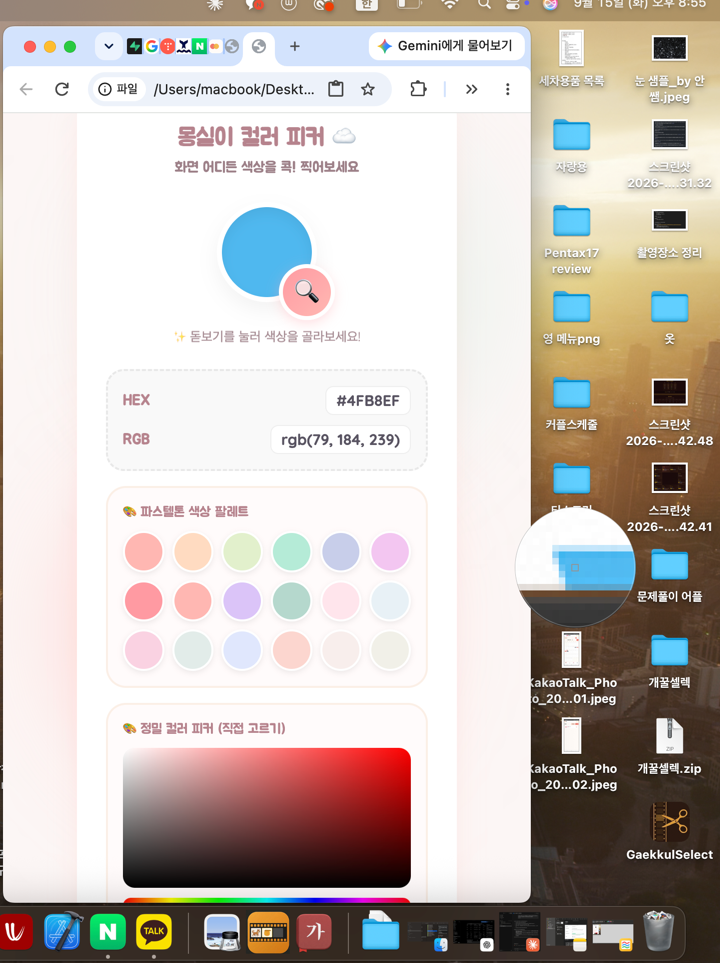
마우스를 가져가기만 하면 돋보기가 색상을 정확히 선택할 수 있게 만들어주네요!
클릭하면 바로 색상 정보를 얻을 수가 있지요!
이건 최근 업데이트된 제미나이 3.8-flash 모드로 만들었어요. 몇 달전에 처음 ai 기능을 써볼 때보다도 훨씬 코드 길이도 길어지고 잘 만들어주는거 있죠...
구조가 크게 보면 아래와 같네용 ㅎㅎ
html
head
style
/style
body
script
/script
/body
/html
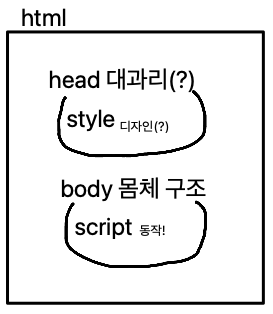
처음에 유튜브에서 기초 배울 때 이런거 배웠었는데 ㅋㅋ 딱 이렇게 맹글어주나봐요
<!DOCTYPE html>
<html lang="ko">
<head>
<meta charset="UTF-8">
<meta name="viewport" content="width=device-width, initial-scale=1.0">
<title>몽실몽실 컬러 피커 ☁️</title>
<!-- 구글 폰트: 부드럽고 둥근 폰트 적용 -->
<link href="https://fonts.googleapis.com/css2?family=Quicksand:wght@400;500;700&family=Jua&display=swap" rel="stylesheet">
<style>
:root {
--bg-color: #fcf6f5;
--card-bg: #ffffff;
--primary-color: #ffb7b2;
--secondary-color: #ffdac1;
--text-color: #6d6875;
--accent-color: #b5ead7;
--shadow: 0 10px 25px rgba(255, 183, 178, 0.2);
--btn-grad-start: #ff9aa2;
--btn-grad-end: #ffb7b2;
}
* {
box-sizing: border-box;
margin: 0;
padding: 0;
}
body {
font-family: 'Jua', 'Quicksand', sans-serif;
background-color: var(--bg-color);
color: var(--text-color);
display: flex;
justify-content: center;
align-items: center;
min-height: 100vh;
overflow-x: hidden;
padding: 40px 0;
}
/* 배경에 몽실몽실 떠다니는 원 효과 */
.background-blob {
position: absolute;
width: 300px;
height: 300px;
background: var(--secondary-color);
border-radius: 50%;
filter: blur(60px);
opacity: 0.5;
z-index: -1;
animation: float 8s ease-in-out infinite alternate;
}
.blob2 {
top: 10%;
right: 15%;
background: var(--accent-color);
animation-delay: -3s;
}
.blob1 {
bottom: 10%;
left: 15%;
background: var(--primary-color);
}
@keyframes float {
0% { transform: translateY(0px) scale(1); }
100% { transform: translateY(20px) scale(1.05); }
}
/* 메인 카드 박스 */
.card {
background-color: var(--card-bg);
width: 380px;
padding: 30px 25px;
border-radius: 30px;
box-shadow: var(--shadow);
text-align: center;
border: 4px solid #fff;
position: relative;
}
h1 {
font-size: 1.5rem;
margin-bottom: 6px;
color: #b5838d;
}
p.subtitle {
font-size: 0.9rem;
margin-bottom: 25px;
color: #9d8189;
}
/* 돋보기 및 색상 미리보기 영역 */
.preview-container {
position: relative;
width: 100px;
height: 100px;
margin: 0 auto 15px auto;
}
.color-preview {
width: 100%;
height: 100%;
border-radius: 50%;
background-color: #ffdac1;
box-shadow: inset 0 6px 12px rgba(0,0,0,0.06), 0 8px 20px rgba(0,0,0,0.05);
transition: background-color 0.4s ease;
border: 5px solid #fff;
}
/* 돋보기 아이콘 버튼 스타일 */
.pick-btn-wrapper {
position: absolute;
bottom: -18px;
right: -18px;
z-index: 10;
}
.pick-btn {
background: linear-gradient(135deg, var(--btn-grad-start), var(--btn-grad-end));
color: white;
border: 4px solid #fff;
width: 56px;
height: 56px;
border-radius: 50%;
cursor: pointer;
box-shadow: 0 4px 12px rgba(255, 154, 162, 0.3);
transition: all 0.3s cubic-bezier(0.175, 0.885, 0.32, 1.275);
display: flex;
align-items: center;
justify-content: center;
font-size: 24px;
line-height: 1;
}
.pick-btn:hover {
transform: translateY(-6px) scale(1.05);
box-shadow: 0 15px 25px rgba(255, 154, 162, 0.5);
background: linear-gradient(135deg, var(--btn-grad-end), var(--btn-grad-start));
}
.pick-btn:active {
transform: translateY(-2px) scale(0.98);
box-shadow: 0 5px 15px rgba(255, 154, 162, 0.4);
}
.pick-btn:focus {
outline: none;
}
/* 돋보기 설명 텍스트 */
.helper-text {
font-family: 'Quicksand', sans-serif;
font-weight: 400;
font-size: 13px;
color: #9d8189;
margin-top: 28px;
margin-bottom: 22px;
opacity: 0.9;
animation: bounceText 2s ease-in-out infinite;
}
@keyframes bounceText {
0%, 100% { transform: translateY(0); }
50% { transform: translateY(-3px); }
}
/* 컬러 코드 정보 박스 */
.info-box {
background-color: #f9f9f9;
border-radius: 18px;
padding: 15px;
display: flex;
flex-direction: column;
gap: 10px;
border: 2px dashed #e8e8e8;
margin-bottom: 15px;
}
.color-code-row {
display: flex;
justify-content: space-between;
align-items: center;
font-size: 0.95rem;
}
.color-code-row span.label {
color: #b5838d;
font-weight: bold;
}
.color-code-row span.value {
background: #fff;
padding: 4px 10px;
border-radius: 8px;
border: 1px solid #eee;
font-family: 'Quicksand', sans-serif;
font-weight: 700;
color: #595462;
}
/* 🎨 1. 파스텔 색상표 영역 */
.palette-section {
text-align: left;
background: #fffbfb;
padding: 15px;
border-radius: 20px;
border: 2px solid #fbeee6;
margin-bottom: 15px;
}
.palette-title {
font-size: 0.85rem;
color: #b5838d;
margin-bottom: 10px;
display: flex;
align-items: center;
gap: 5px;
}
.palette-grid {
display: grid;
grid-template-columns: repeat(6, 1fr);
gap: 8px;
}
.color-chip {
width: 100%;
aspect-ratio: 1;
border-radius: 50%;
cursor: pointer;
border: 2px solid #ffffff;
box-shadow: 0 2px 6px rgba(0,0,0,0.08);
transition: all 0.2s ease;
}
.color-chip:hover {
transform: scale(1.15);
box-shadow: 0 4px 10px rgba(0,0,0,0.15);
}
.color-chip:active {
transform: scale(0.95);
}
/* 🎨 2. 정밀 HTML 컬러표 (Canvas & Hue Slider 스타일) */
.advanced-picker-section {
background: #fffbfb;
padding: 15px;
border-radius: 20px;
border: 2px solid #fbeee6;
text-align: left;
}
.advanced-title {
font-size: 0.85rem;
color: #b5838d;
margin-bottom: 10px;
display: flex;
align-items: center;
gap: 5px;
}
.picker-container {
display: flex;
flex-direction: column;
gap: 10px;
align-items: center;
}
#satCanvas {
width: 100%;
height: 140px;
border-radius: 12px;
cursor: crosshair;
display: block;
box-shadow: inset 0 0 10px rgba(0,0,0,0.1);
}
#hueCanvas {
width: 100%;
height: 16px;
border-radius: 10px;
cursor: pointer;
display: block;
}
.picker-result-bar {
display: flex;
align-items: center;
justify-content: space-between;
background: #ffffff;
padding: 8px 12px;
border-radius: 12px;
border: 1px solid #e8e8e8;
width: 100%;
margin-top: 4px;
}
.selected-color-dot {
width: 24px;
height: 24px;
border-radius: 50%;
background-color: #f54927;
border: 2px solid #fff;
box-shadow: 0 2px 4px rgba(0,0,0,0.1);
}
.color-code-display {
font-family: 'Quicksand', sans-serif;
font-weight: 700;
font-size: 0.95rem;
color: #333;
}
.copy-icon-btn {
background: none;
border: none;
cursor: pointer;
font-size: 1rem;
padding: 4px;
border-radius: 6px;
transition: background 0.2s;
}
.copy-icon-btn:hover {
background: #f0f0f0;
}
.format-select {
background: #f9f9f9;
border: 1px solid #ddd;
border-radius: 8px;
padding: 4px 8px;
font-family: 'Quicksand', sans-serif;
font-size: 0.8rem;
cursor: pointer;
color: #555;
}
/* 복사 알림 토스트 메시지 */
.toast {
position: absolute;
bottom: -50px;
left: 50%;
transform: translateX(-50%) translateY(10px);
background-color: #6d6875;
color: white;
padding: 8px 20px;
border-radius: 20px;
font-size: 0.9rem;
opacity: 0;
transition: all 0.3s ease;
pointer-events: none;
white-space: nowrap;
box-shadow: 0 5px 10px rgba(0,0,0,0.1);
z-index: 100;
}
.toast.show {
opacity: 1;
transform: translateX(-50%) translateY(0);
}
.unsupported {
margin-top: 15px;
font-size: 0.8rem;
color: #e5989b;
display: none;
text-align: center;
}
</style>
</head>
<body>
<!-- 부드러운 배경 블랍들 -->
<div class="background-blob blob1"></div>
<div class="background-blob blob2"></div>
<div class="card">
<h1>몽실이 컬러 피커 ☁️</h1>
<p class="subtitle">화면 어디든 색상을 콕! 찍어보세요</p>
<div class="preview-container">
<div class="color-preview" id="colorPreview" title="선택된 색상"></div>
<!-- 작고 귀여운 돋보기 버튼 -->
<div class="pick-btn-wrapper">
<button class="pick-btn" id="pickBtn" title="색상 추출">
🔍
</button>
</div>
</div>
<div class="helper-text">✨ 돋보기를 눌러 색상을 골라보세요!</div>
<div class="info-box">
<div class="color-code-row">
<span class="label">HEX</span>
<span class="value" id="hexVal">#FFDAC1</span>
</div>
<div class="color-code-row">
<span class="label">RGB</span>
<span class="value" id="rgbVal">rgb(255, 218, 193)</span>
</div>
</div>
<!-- 🎨 1. 파스텔 색상표 영역 (복구 완료!) -->
<div class="palette-section">
<div class="palette-title">🎨 파스텔톤 색상 팔레트</div>
<div class="palette-grid" id="paletteGrid"></div>
</div>
<!-- 🎨 2. 정밀 HTML 컬러표 (Canvas Color Picker) -->
<div class="advanced-picker-section">
<div class="advanced-title">🎨 정밀 컬러 피커 (직접 고르기)</div>
<div class="picker-container">
<!-- 명도/채도 박스 -->
<canvas id="satCanvas" width="330" height="140"></canvas>
<!-- 무지개 색조(Hue) 바 -->
<canvas id="hueCanvas" width="330" height="16"></canvas>
<!-- 하단 결과 및 복사 바 -->
<div class="picker-result-bar">
<div style="display: flex; align-items: center; gap: 8px;">
<div class="selected-color-dot" id="pickerDot"></div>
<span class="color-code-display" id="pickerCodeDisplay">#F54927</span>
</div>
<div style="display: flex; align-items: center; gap: 6px;">
<button class="copy-icon-btn" id="pickerCopyBtn" title="복사하기">📋</button>
<select class="format-select" id="formatSelect">
<option value="hex">Hex</option>
<option value="rgb">Rgb</option>
</select>
</div>
</div>
</div>
</div>
<div class="unsupported" id="unsupportedMsg">
이 브라우저는 돋보기(EyeDropper)를 지원하지 않아요 🥲<br>(Chrome, Edge 추천)
</div>
<div class="toast" id="toast">클립보드에 복사되었어요! ✨</div>
</div>
<script>
const pickBtn = document.getElementById('pickBtn');
const colorPreview = document.getElementById('colorPreview');
const hexVal = document.getElementById('hexVal');
const rgbVal = document.getElementById('rgbVal');
const unsupportedMsg = document.getElementById('unsupportedMsg');
const toast = document.getElementById('toast');
const paletteGrid = document.getElementById('paletteGrid');
// 파스텔 컬러 리스트
const pastelColors = [
'#FFB7B2', '#FFDAC1', '#E2F0CB', '#B5EAD7', '#C7CEEA', '#F3C6F1',
'#FF9AA2', '#FFB7B2', '#DAC4F7', '#B5D8CC', '#FFE5EC', '#E8F1F5',
'#FAD2E1', '#E2ECE9', '#DFE7FD', '#FCD5CE', '#F8EDEB', '#F1F0E8'
];
// 파스텔 색상표 칩 동적 생성
pastelColors.forEach(color => {
const chip = document.createElement('div');
chip.className = 'color-chip';
chip.style.backgroundColor = color;
chip.title = color;
chip.addEventListener('click', () => {
applyColor(color);
showToast();
});
paletteGrid.appendChild(chip);
});
// 상단 메인 UI 통합 적용 함수
function applyColor(hexColor) {
const rgbColor = hexToRgb(hexColor);
colorPreview.style.backgroundColor = hexColor;
hexVal.textContent = hexColor.toUpperCase();
rgbVal.textContent = `rgb(${rgbColor.r}, ${rgbColor.g}, ${rgbColor.b})`;
navigator.clipboard.writeText(hexColor.toUpperCase());
}
// EyeDropper API 지원 확인
if (!window.EyeDropper) {
pickBtn.style.opacity = '0.6';
pickBtn.style.cursor = 'not-allowed';
pickBtn.title = '지원하지 않는 브라우저입니다';
unsupportedMsg.style.display = 'block';
}
pickBtn.addEventListener('click', async () => {
if (!window.EyeDropper) {
return;
}
try {
const eyeDropper = new EyeDropper();
const result = await eyeDropper.open();
const hexColor = result.sRGBHex;
applyColor(hexColor);
showToast();
} catch (e) {
console.log('색상 추출이 취소되었습니다.');
}
});
function hexToRgb(hex) {
let sanitizedHex = hex.replace('#', '');
let bigint = parseInt(sanitizedHex, 16);
let r = (bigint >> 16) & 255;
let g = (bigint >> 8) & 255;
let b = bigint & 255;
return { r, g, b };
}
function showToast() {
toast.classList.add('show');
setTimeout(() => {
toast.classList.remove('show');
}, 2000);
}
// ==========================================
// 🎨 하단 2차원 컬러 표 (Canvas Color Picker) 로직
// ==========================================
const satCanvas = document.getElementById('satCanvas');
const satCtx = satCanvas.getContext('2d', { willReadFrequently: true });
const hueCanvas = document.getElementById('hueCanvas');
const hueCtx = hueCanvas.getContext('2d', { willReadFrequently: true });
const pickerDot = document.getElementById('pickerDot');
const pickerCodeDisplay = document.getElementById('pickerCodeDisplay');
const pickerCopyBtn = document.getElementById('pickerCopyBtn');
const formatSelect = document.getElementById('formatSelect');
let currentHue = 0;
let currentSat = 100;
let currentVal = 100;
let activeHex = '#F54927';
function drawHueSlider() {
const width = hueCanvas.width;
const height = hueCanvas.height;
const grad = hueCtx.createLinearGradient(0, 0, width, 0);
for (let i = 0; i <= 360; i += 60) {
grad.addColorStop(i / 360, `hsl(${i}, 100%, 50%)`);
}
hueCtx.fillStyle = grad;
hueCtx.fillRect(0, 0, width, height);
}
function drawSatBox(hue) {
const width = satCanvas.width;
const height = satCanvas.height;
satCtx.clearRect(0, 0, width, height);
satCtx.fillStyle = `hsl(${hue}, 100%, 50%)`;
satCtx.fillRect(0, 0, width, height);
const gradWhite = satCtx.createLinearGradient(0, 0, width, 0);
gradWhite.addColorStop(0, 'rgba(255,255,255,1)');
gradWhite.addColorStop(1, 'rgba(255,255,255,0)');
satCtx.fillStyle = gradWhite;
satCtx.fillRect(0, 0, width, height);
const gradBlack = satCtx.createLinearGradient(0, 0, 0, height);
gradBlack.addColorStop(0, 'rgba(0,0,0,0)');
gradBlack.addColorStop(1, 'rgba(0,0,0,1)');
satCtx.fillStyle = gradBlack;
satCtx.fillRect(0, 0, width, height);
}
function hsvToRgb(h, s, v) {
s /= 100;
v /= 100;
let c = v * s;
let x = c * (1 - Math.abs((h / 60) % 2 - 1));
let m = v - c;
let r = 0, g = 0, b = 0;
if (0 <= h && h < 60) { r = c; g = x; b = 0; }
else if (60 <= h && h < 120) { r = x; g = c; b = 0; }
else if (120 <= h && h < 180) { r = 0; g = c; b = x; }
else if (180 <= h && h < 240) { r = 0; g = x; b = c; }
else if (240 <= h && h < 300) { r = x; g = 0; b = c; }
else if (300 <= h && h <= 360) { r = c; g = 0; b = x; }
return {
r: Math.round((r + m) * 255),
g: Math.round((g + m) * 255),
b: Math.round((b + m) * 255)
};
}
function rgbToHex(r, g, b) {
return "#" + [r, g, b].map(x => {
const hex = x.toString(16);
return hex.length === 1 ? "0" + hex : hex;
}).join("").toUpperCase();
}
function updateSelectedColor() {
const rgb = hsvToRgb(currentHue, currentSat, currentVal);
activeHex = rgbToHex(rgb.r, rgb.g, rgb.b);
pickerDot.style.backgroundColor = activeHex;
if (formatSelect.value === 'hex') {
pickerCodeDisplay.textContent = activeHex;
} else {
pickerCodeDisplay.textContent = `rgb(${rgb.r}, ${rgb.g}, ${rgb.b})`;
}
}
drawHueSlider();
drawSatBox(currentHue);
updateSelectedColor();
let isDraggingHue = false;
hueCanvas.addEventListener('mousedown', (e) => {
isDraggingHue = true;
handleHueMove(e);
});
window.addEventListener('mousemove', (e) => {
if (isDraggingHue) handleHueMove(e);
if (isDraggingSat) handleSatMove(e);
});
window.addEventListener('mouseup', () => {
isDraggingHue = false;
isDraggingSat = false;
});
function handleHueMove(e) {
const rect = hueCanvas.getBoundingClientRect();
let x = e.clientX - rect.left;
if (x < 0) x = 0;
if (x > rect.width) x = rect.width;
currentHue = (x / rect.width) * 360;
if (currentHue >= 360) currentHue = 359;
drawSatBox(currentHue);
updateSelectedColor();
}
let isDraggingSat = false;
satCanvas.addEventListener('mousedown', (e) => {
isDraggingSat = true;
handleSatMove(e);
});
function handleSatMove(e) {
const rect = satCanvas.getBoundingClientRect();
let x = e.clientX - rect.left;
let y = e.clientY - rect.top;
if (x < 0) x = 0;
if (x > rect.width) x = rect.width;
if (y < 0) y = 0;
if (y > rect.height) y = rect.height;
currentSat = (x / rect.width) * 100;
currentVal = 100 - ((y / rect.height) * 100);
updateSelectedColor();
}
formatSelect.addEventListener('change', () => {
updateSelectedColor();
});
pickerCopyBtn.addEventListener('click', () => {
applyColor(activeHex);
showToast();
});
</script>
</body>
</html>
뚝딱 만들었어도 꽤 길이도 길고 양이 많네요..
그냥 복붙한다고 몰랐는데,,
펼쳐놓으니 엄청 기네요 ㅎㅎ
세상이 진짜 빠르게 변하는거 같아요
이런거 유튜브 몇시간씩 보면서 배우고 그랬는데
(물론 거의 다 까먹고 js가 이해 안되서 포기했었지만 ㅜ)
AI가 세상을 이렇게까지 바꿔놓을 줄은.. 역시 사람은 도구르ㄹ 써야...🤣🤣🤣
몽실몽실 Color Picker.html
0.02MB
혹시 필요하신분은 받아가세용~! ㅋㅋ
반응형
'작은 실험실 > 티스토리 코딩' 카테고리의 다른 글
| 티스토리 하이퍼링크 밑줄 없애기 (text-decoration속성) (0) | 2021.05.08 |
|---|---|
| 티스토리 HTML 버튼 만들기! (2) | 2020.12.08 |
| html모드에서의 글자색, 글자배경색 (0) | 2020.11.29 |
| 줄간격 조절하기 (2) | 2020.11.24 |
| 티스토리 글자 크기 바꾸기 (2) | 2020.11.23 |



댓글 영역